How to Solve a Quadratic Equation on a Calculator: Step by Step

A quadratic equation is any equation you can write as ax² + bx + c = 0. Solving it by hand means factoring or the quadratic formula, and both are slow. A calculator takes the slow part away. Here is how to do it on the three kinds of calculators students actually own: a scientific calculator, a graphing calculator, and the free one on this site.
Start here: does it factor?
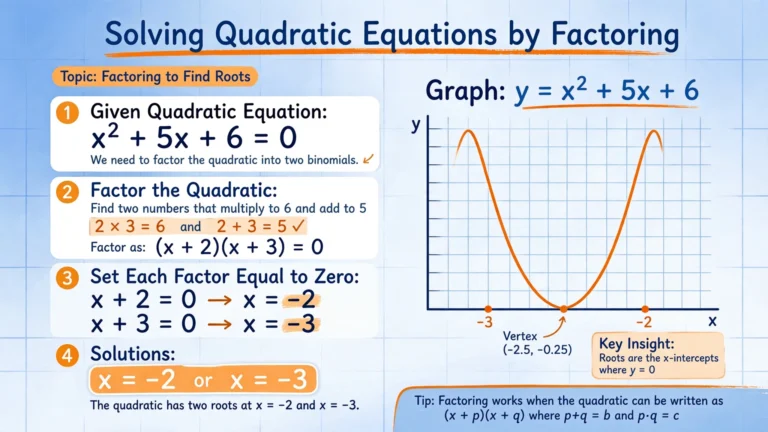
Before you touch the calculator, glance at the equation. x² + 5x + 6 = 0 factors into (x + 2)(x + 3) = 0, so x = −2 or x = −3. Factoring is still the fastest route when the numbers cooperate. If the x² term has a coefficient, like 6x² + 7x + 2 = 0, our AC method calculator walks through it step by step. When it does not factor neatly, reach for the methods below.
Method 1: the quadratic formula on a scientific calculator
The formula is x = (−b ± √(b² − 4ac)) / 2a. The trick on a scientific calculator is to work in two passes instead of typing the whole thing at once.
Take 2x² − 3x − 5 = 0. Here a = 2, b = −3, c = −5.
First pass: the discriminant. Type b² − 4ac: (−3)² − 4 × 2 × (−5) = 9 + 40 = 49. Press the square root key: √49 = 7.
Second pass: the two answers. x = (−(−3) + 7) / (2 × 2) = 10/4 = 2.5, and x = (3 − 7)/4 = −1.
So x = 2.5 or x = −1. Check the first one: 2(2.5)² − 3(2.5) − 5 = 12.5 − 7.5 − 5 = 0. It works.
Two habits save you here. Use parentheses around −b and around the full denominator 2a; typing 3 + 7 / 4 without them gives the wrong answer because the calculator divides only the 7. And store the discriminant in memory (the STO key) so the second pass uses the exact value, not a rounded one.
What a negative discriminant means: if b² − 4ac comes out negative, like in x² + x + 1 = 0 where it equals −3, there are no real solutions. Your calculator will throw an error on the square root step, and that error is the answer: nothing real to find.
Method 2: the equation solver on a graphing calculator
Graphing calculators have a built-in mode that skips the formula entirely.
On a TI-84 Plus: press APPS, open PlySmlt2, choose “Poly Root Finder”, set the degree to 2, and type in a, b, and c. The screen shows both roots at once.
On a Casio fx-991 class model: press MODE, choose EQUATION, pick polynomial degree 2, and enter the three coefficients.
One warning: some teachers and exam boards require this mode to be cleared or disabled during tests. If yours does, Method 1 is the one to practice, because the quadratic formula is always allowed.
Method 3: solve it online in seconds
If you are already on this page, the fastest option is our quadratic formula calculator: type a, b, and c and it shows both solutions with every step. Prefer completing the square instead? The completing the square calculator takes that route.
The mistakes everyone makes
- Dropping the minus sign. In −b, the b keeps its own sign first. If b = −3, then −b = 3, not −3.
- Forgetting the plus-or-minus. The ± gives two answers. Students who only compute one lose half the solution set.
- Skipping the check. Plugging each answer back into the original equation takes ten seconds and catches nearly every slip.
- Wrong mode. The quadratic formula does not care about degree/radian mode, but if you are graphing to check, make sure the window actually shows the x-intercepts.
Related tools
Quadratics and factoring overlap a lot: every factored quadratic is a factoring problem in disguise. Our general trinomial calculator factors ax² + bx + c directly, the simple trinomial calculator handles x² + bx + c, and the factoring by grouping calculator covers four-term expressions. The step-by-step factoring calculator tries every method for you, the how to factor polynomials guide explains which method fits which problem, and the main factoring calculator is the fastest starting point. See every tool on the calculators page.